Describe your business and get a site
Answer two short questions about your business and yaya generates a website draft you can review.
Last updated
Before you start
- A Google account or an email address to sign in with.
- Two to five sentences about the business. The minimum is 20 characters and the maximum is 2000.
- About 5 minutes.
Create the draft
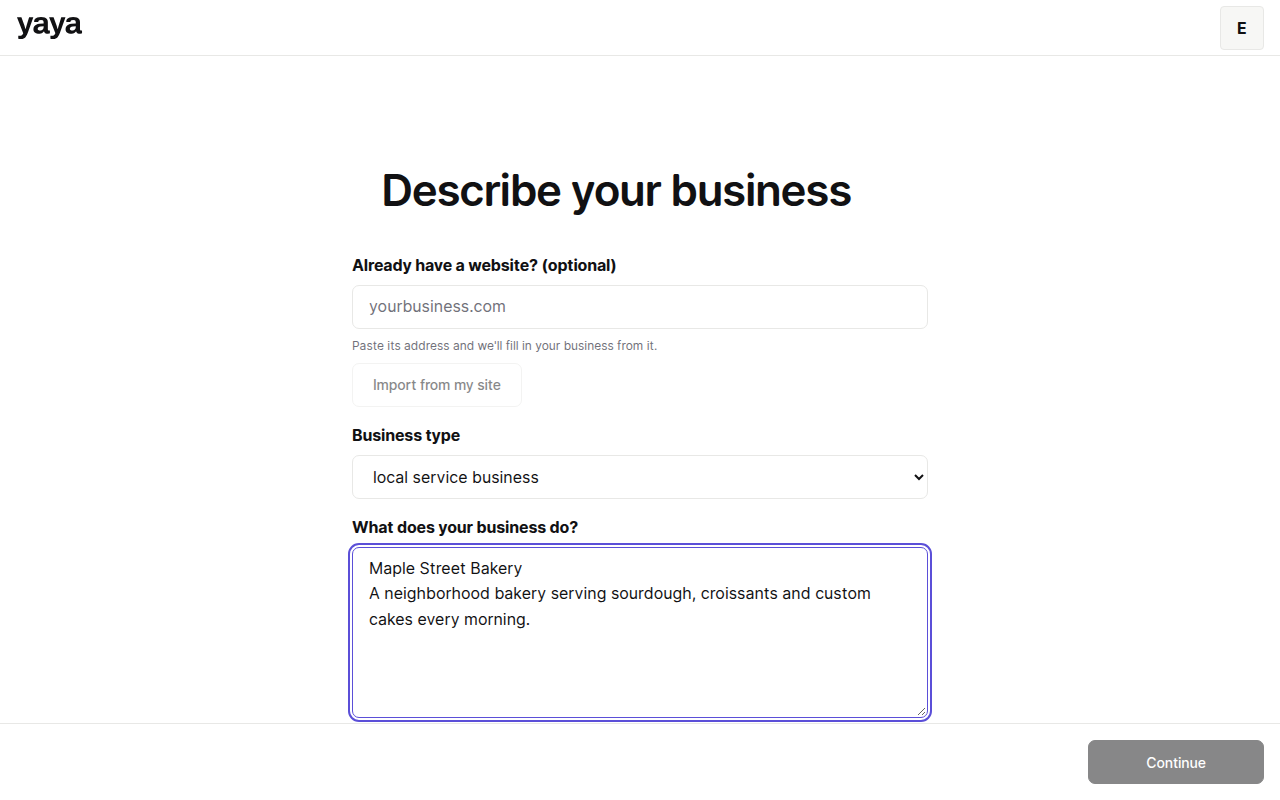
- Open yaya.page/onboarding.
- Choose a Business type.
- Type what the business does under What does your business do? Plain language is fine.
- Click Continue.
- Type your city or address and pick a suggestion from the list.
- Choose the Website language if it is not English.
- Click Sign in to continue if you are signed out. Sign in with Google or an email link.
- Click Next.
- Wait for generation to finish. You land in the site editor.
Your answers stay in your browser while you sign in, so you do not retype them.
What happens next
The draft is private. Nothing is public until you publish. Review it in the editor, then follow Publish your site.
Already have a site? Paste its address in the first step and yaya fills in the description. See Rebuild your site from its URL.
Fix common problems
The description is too short. Add detail until it reaches 20 characters.
Next stays grey on the location step. Pick one of the suggestions. Typed text that matches no suggestion is not accepted. You cannot skip this step.
You see a draft error or an empty editor. Generation did not start. Open the workspace again, and if the site is still missing, email support@yaya.page.
You cannot create another site. The free plan allows 3 sites per account.
Was this guide helpful?
Still stuck? Email support@yaya.page.